Event Propagation in JavaScript
Event Bubbling, Event Capturing, Event Delegation

Introduction
An event travels or propagates through the DOM tree, this is called Event propagation.
This can happen in 2 ways -
- From top to bottom
- From bottom to top
Let's understand using an example
- Take 3 divs, a grandparent div, inside that we have a parent div and inside that, we have our target div.
<div id="grand-parent">
    <div id="parent">
        <div id="target">
        </div>
    </div>
</div>
- Attach onClick handlers to all divs console logging the name of the divs.
grandParent.addEventListener("click",() => console.log("Grand Parent"))
parent.addEventListener("click",() => console.log("Parent"))
target.addEventListener("click",() => console.log("Target"))
-Now click on the target div (smallest one)
Default order of onClick event
- We get Target => Parent => Grandparent logged in the console.
- This is an example of the bottom to top event propagation or Event Bubbling.
- So, without doing anything we got to see the event bubbling, so it is safe to say the onClick event by default bubbles up. (Not all events bubble up by default)
Remember event bubbling as bubbles coming up to the top surface of a water
Reversing the order of events
Now, we want to reverse the order of events. But how do we do that? There's a third parameter taken by the addEventListner which accepts a boolean value, which is false by default. This attribute tells the handler if the event is to be captured or not.
If the third parameter is set to true the event capturing mode is enabled.
grandParent.addEventListener("click",()=>console.log("Grand Parent"),true)
parent.addEventListener("click",()=>console.log("Parent"),true)
target.addEventListener("click",()=>console.log("Target"),true)
-Now click on the target div (smallest one)
- We get Grandparent => Parent => Target logged in the console.
- This is an example of top to bottom event propagation or Event Capturing/Trickling.
Remember event capturing/trickling as water trickling down the slope of a mountain
Order of event propagation
Consider the code below where only the parent event has capture set to true
grandParent.addEventListener("click",() => console.log("Grand Parent"))
parent.addEventListener("click",() => console.log("Parent"),true)
target.addEventListener("click",() => console.log("Target"))
What would be the logged on the console on clicking the target(smallest) div now?
on clicking the target div(smallest div) :
- We get Parent => Target => Grandparent logged in the console.
- To predict this output we need to remember one simple thing -
In an event propagation cycle, the capturing phase occurs first then followed by the target phase and bubbling phase.
Consider the image below -
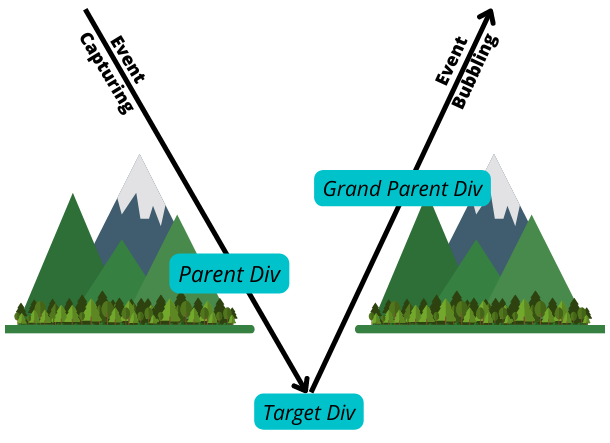
- The event propagation happens down the mountain and then up the mountain.
- Events are placed on the vertical plane based on the hierarchy in the DOM. i.e. Grandparent contains the parent so the grandparent will be above the parent.
- Also, based on the true/false attribute of the capture flag events are placed on the capture line or bubble line
- Now we traverse as per the arrows shown and we get the expected output.
How to stop this propagation?
So far we saw an event propagating either up or down the DOM tree but what if we only want the event to happen on the target div and do not propagate, say we want to log on which div the user clicked, here we could use something as: e.stopPropagation()
grandParent.addEventListener("click",() => console.log("Grand Parent"))
parent.addEventListener("click",() => console.log("Parent"))
target.addEventListener(
  "click",
  (e) => {
    e.stopPropagation();
    console.log("Target");
  }
)
Try clicking on target(smallest) div :
Here, since the target has a stopPropagation so events from the target won't propagate. i.e. on clicking on target(smallest) div we will see only target in the console.
Try clicking on the parent div now- Since there is no such stopPropagation on the parent, clicking on the parent will still behave as it behaved before and consoled parent => grandparent
Event Delegation
Event delegation is a performance optimization technique. Say you have a shopping site where there are multiple categories, now if you attach onClick handlers to each category then when the page is fully loaded then it will have too many event listeners. Having too many event listeners can slow down the performance of a web app and hence event delegation comes to the rescue.
Implementation
Instead of attaching event listeners to all target elements, attach an event listener to the parent and with the help of the event-bubbling get what target has been clicked.
const parent = document.querySelector("#parent");
parent.addEventListener("click",(e) => console.log(e.target.innerText))
Click on the numbered divs it will console the number of the div clicked
TLDR
Event Bubbling - start from the target element and traverse up in the DOM tree Event Capturing - start from the top of the DOM tree and traverse down to the target Event Delegation - Instead of attaching multiple events listeners attach one event listener to the parent and with the help of event bubbling get on which element the event has occurred.
About the author
UI Engineer @Flipkart I like to explore new technologies & build projects on them.
Comments
Join the discussionNo comments yet. Be the first to comment.


